
 Mon-Fri 9:00 - 18:00 (GMT+3)


PMI Testing and XRF Traceability: Audit-Ready QC for Manufacturers
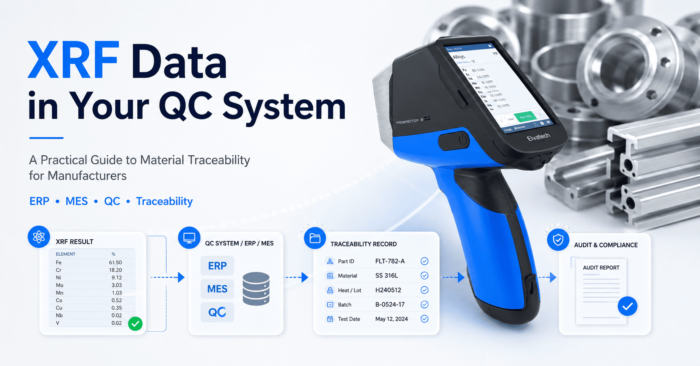
An automotive Tier 1 supplier in Monterrey ships 40,000 aluminum brackets per month to three OEM customers in the US. Each bracket gets PMI-tested before it ships. The XRF data? It lives on a technician's laptop in a folder called "results_final_v3." No timestamps. No batch linkage. No integration with the production record.
When a customer audit asks for traceability documentation on a specific batch from eight months ago, the QC manager spends two days manually reconstructing records. He finds what he needs — barely. But the customer notice lands anyway: "Improve your documentation systems or we revisit the supplier agreement."
This isn't an unusual story. The XRF analyzer did its job perfectly. The process around it failed.
Material Traceability Requirements: ISO 9001, IATF 16949, and AS9100 Explained
ISO 9001:2015 requires documented evidence that products meet specifications. IATF 16949 — the automotive quality standard — goes further, demanding full traceability from raw material receipt through delivery. For aerospace suppliers working under AS9100, traceability is even more granular: every part, every material verification record, tied to a specific lot and linked to a customer order.
Regulators and OEMs don't just want proof that you tested materials. They want proof that those specific materials — the ones in that specific shipment — were tested, when, by whom, on which equipment, and what the results showed.
XRF analyzers generate exactly that data. The question is whether manufacturers capture it systematically or let it disappear into spreadsheets and PDF archives.
What the ProSpector 3 XRF Analyzer Captures — And Why It's Already Audit-Ready
Every modern XRF analyzer produces a test record that includes the elemental composition of the sample, the timestamp, the operator ID, the test mode used, and the equipment serial number. Some models also record part number fields entered by the operator and batch or heat number references.
That's a complete quality record in a single data point. The problem isn't the data — it's what happens to it after the trigger is pulled.
Elvatech analyzers store results internally and export via USB or direct PC connection in standard formats — CSV, XML, and PDF reports. The ProSpector 3 line supports custom data fields, so operators can tag each test with a purchase order number, supplier ID, or incoming inspection lot before they even pull the trigger. That metadata is what makes downstream traceability possible. And critically: the analyzer software can be configured to automatically write reports or CSV files to a mapped network folder the moment a test completes — no manual export step required.
Three Ways to Integrate XRF Analyzer Data into Your QC Documentation System
Manufacturers don't all need the same level of integration. The right approach depends on test volume, existing systems, and compliance requirements.
Model 1: Structured File Management (Entry Level)
No software integration required. Operators export test results to a shared folder structure organized by date, supplier, and material type. A simple naming convention — 2026-05-12_Supplier-Acme_Heat-4471_Al6061.csv — makes records searchable and auditable without any custom development.
This works for low-volume incoming inspection at facilities testing fewer than 50 samples per day. Setup time: one afternoon. Cost: zero. For a small job shop or a manufacturer just starting a PMI program, this gets you from "folder called results_final_v3" to something defensible in an audit.
Model 2: Automatic Network Folder Output + QC Software (Mid-Level)
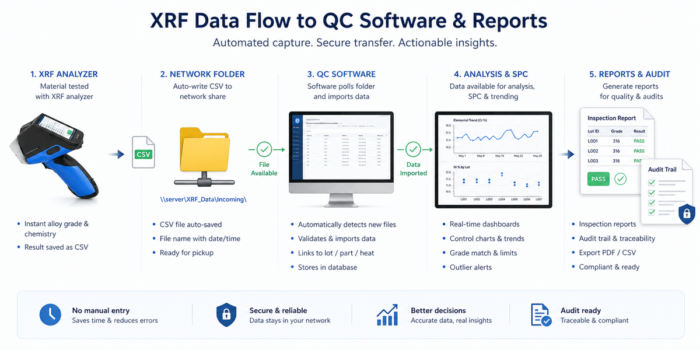
This is where the real efficiency gain happens. Configure the analyzer software to automatically write a CSV or formatted report to a shared network folder every time a test completes. No operator action needed after the test itself. The file appears in the folder with the correct timestamp and all custom field data already embedded.
From there, QC software platforms — Q-DAS, InfinityQS, Minitab Engage, and others — can monitor that folder and pull incoming files automatically. Test results link to specific incoming inspection lots, supplier certificates, and purchase orders. Statistical process control charts can flag drift in material composition across supplier batches over time.
This is the standard for automotive Tier 1-2 suppliers in the US Midwest and Mexican maquiladoras operating under IATF 16949. A stamping plant in Querétaro that supplies Ford and GM needs to demonstrate not just that it tests incoming aluminum coil, but that the Si and Mg content in that coil is within spec and consistent across the last 90 days of deliveries. QC software fed by automatic XRF exports makes that a two-click report.
Model 3: ERP Integration via File-Based Import (Advanced)
Direct real-time API connections between XRF analyzers and ERP systems aren't standard in the industry — and for most manufacturers, they aren't necessary. File-based integration is mature, reliable, and widely supported.
Most ERP platforms — SAP, Oracle, Microsoft Dynamics — include import routines that can process incoming CSV files on a scheduled basis. Set up the XRF analyzer to write results to the network folder, configure the ERP import job to run every 15 or 30 minutes, and the result is a near-automated pipeline from test to production record. A QC manager looking at an incoming inspection lot in SAP sees the XRF results attached within the hour — without anyone manually keying them in.
This level of integration requires some IT involvement to configure the import mapping and schedule, but it's far less complex than custom API development. Many SAP QM implementations already include standard routines for external inspection data that can be adapted for XRF output with minimal modification.
PMI Testing in Mexican Maquiladoras: Meeting IATF 16949 Supplier Requirements
Mexico's automotive manufacturing sector — centered in Monterrey, Saltillo, San Luis Potosí, and Aguascalientes — operates under intense supplier quality pressure from US OEMs. Ford, GM, Stellantis, and their Tier 1 suppliers demand IATF 16949 certification and conduct regular supplier audits that include traceability documentation reviews.
A maquiladora producing transmission components for a Detroit OEM might receive aluminum castings from three different Mexican foundries and two US importers simultaneously. Each supplier uses different alloy formulations. Incoming PMI testing with XRF catches composition deviations before they enter the production line. But without traceability integration, the facility can't demonstrate to the OEM which specific castings were tested, what results they produced, and which finished parts they ended up in.
That linkage — from raw material XRF result to finished part serialization — is what full traceability looks like in practice. Automatic network folder output combined with QC software makes it achievable without adding headcount or custom software development.
Multi-Plant XRF Data Management: One QC System Across All Facilities
Large manufacturers with plants across multiple locations face an added challenge: consistent data formats, centralized reporting, and audit readiness across all sites. A US Tier 1 with plants in Ohio, Tennessee, and Monterrey needs XRF data from all three to look the same in corporate QC reports.
The network folder approach scales to this naturally. Each plant writes XRF output to a site-specific subfolder within a shared corporate network structure. The central QC team pulls reports from all locations using the same QC software instance. No site-by-site variation in how data is stored or retrieved. A QC director preparing for a corporate audit sees results from all three facilities in one place — not three different folder conventions reconstructed over two days.
The key prerequisite: standardized custom field configuration across all analyzers. Every site needs the same operator fields, the same naming conventions, and the same export settings. That's a one-time setup task, not ongoing maintenance.
FAQ: XRF Analyzers for Material Traceability and QC Integration
-
Does XRF data integration require custom software development?
No. The most effective approach — automatic CSV or report output to a network folder — is built into Elvatech analyzer software and requires only configuration, not development. QC software platforms pick up those files automatically. ERP integration via scheduled file imports is also achievable with standard system functionality. -
What data fields should we capture for IATF 16949 compliance?
At minimum: material specification, elemental composition results, test date and time, operator ID, analyzer serial number, and incoming inspection lot or PO reference. Your IATF auditor will want to trace any finished part back to a specific incoming material test result. -
Can one XRF analyzer serve multiple production lines with traceability?
Yes, but workflow discipline is critical. Each operator must correctly enter the lot or PO reference before testing. Configure mandatory custom fields in the analyzer to enforce this — don't rely on operators to remember. -
How long should XRF test records be retained?
ISO 9001 requires retention "as necessary." Automotive customers under IATF 16949 typically specify 15 years or the life of the vehicle plus 10 years. Aerospace (AS9100) records often have indefinite retention requirements for flight-critical components. Storing CSV files on a network server makes long-term retention straightforward and auditable. -
What's the cost difference between file-based and ERP integration?
File-based traceability with automatic network export: essentially zero beyond the analyzer cost. QC software integration: $5,000–$20,000 for platform licenses plus setup. ERP file-import integration: typically $10,000–$30,000 in IT and consulting costs depending on system complexity and existing import infrastructure. -
How quickly does XRF data appear in the network folder after a test?
Immediately. The analyzer software writes the file the moment the test completes. If the ERP import job runs every 30 minutes, data is in the production record within half an hour — with no manual steps between the test and the record. -
Does automatic file output affect analyzer performance or test speed?
No. File writing happens in the background after the measurement is complete. Analysis speed — 3–10 seconds depending on mode — is unaffected.
Conclusion
The XRF analyzer is only half the traceability equation. The other half is what you do with the data it generates. For manufacturers operating under ISO 9001, IATF 16949, or AS9100, "results in a folder" isn't a quality system — it's a liability waiting to surface during an audit.
The ProSpector 3 is built with this reality in mind. Custom data fields let operators tag every test with a PO number, supplier lot, or heat reference before pulling the trigger — so traceability metadata is captured at the source, not reconstructed later. Automatic CSV and report output to a network folder means no manual export step, no forgotten syncs, no version confusion. The data is where it needs to be the moment the measurement is done.
From there, the path to full integration is straightforward. QC software picks up files automatically. ERP systems import them on a schedule. A Tier 1 supplier in Monterrey gets the same audit-ready documentation chain as a facility in Ohio — without custom development, without API projects, without a six-month IT program.
Key takeaways:
- The ProSpector 3 captures complete, timestamped quality records with user-defined fields — traceability starts at the instrument, not the spreadsheet
- Automatic output to a network folder is configured in minutes and eliminates manual export entirely
- File-based ERP import delivers the same functional result as complex API integration — at a fraction of the cost and none of the maintenance burden
- The same workflow scales from a single incoming inspection station to a multi-plant quality network
- Audit preparation that takes two days without integration takes two hours with it
Ready to see how the ProSpector 3 fits into your QC documentation workflow? Contact the Elvatech team to discuss configuration for your specific environment.


